Express
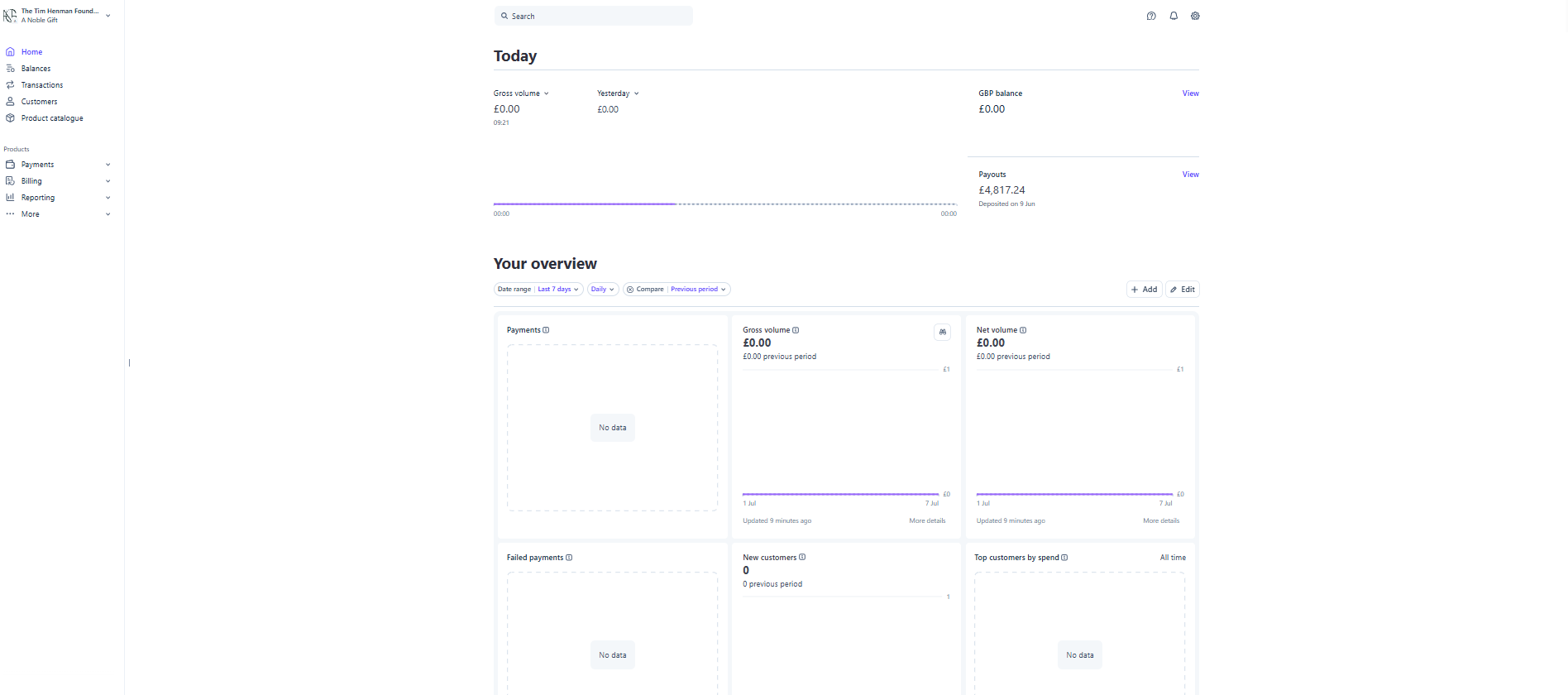
The Express Connected Account features its own unique management dashboard, as follows:
Home
This is your main Stripe Dashboard overview, you can view gross volume, net volume, balances, and payouts at a high level.
Payouts
Pressing "View" on Payouts within the Home Dashboard: if you have enabled automated payouts to your bank account, payouts will be automatically grouped into chunks for transfer. In many cases, if you have several transactions with A Noble Gift taking place in a short window, several amounts raised through several auctions will be grouped into a single payout figure.
However, your Payout dashboard provides a clear breakdown of what transactions make up the payout for your own reconciliation:
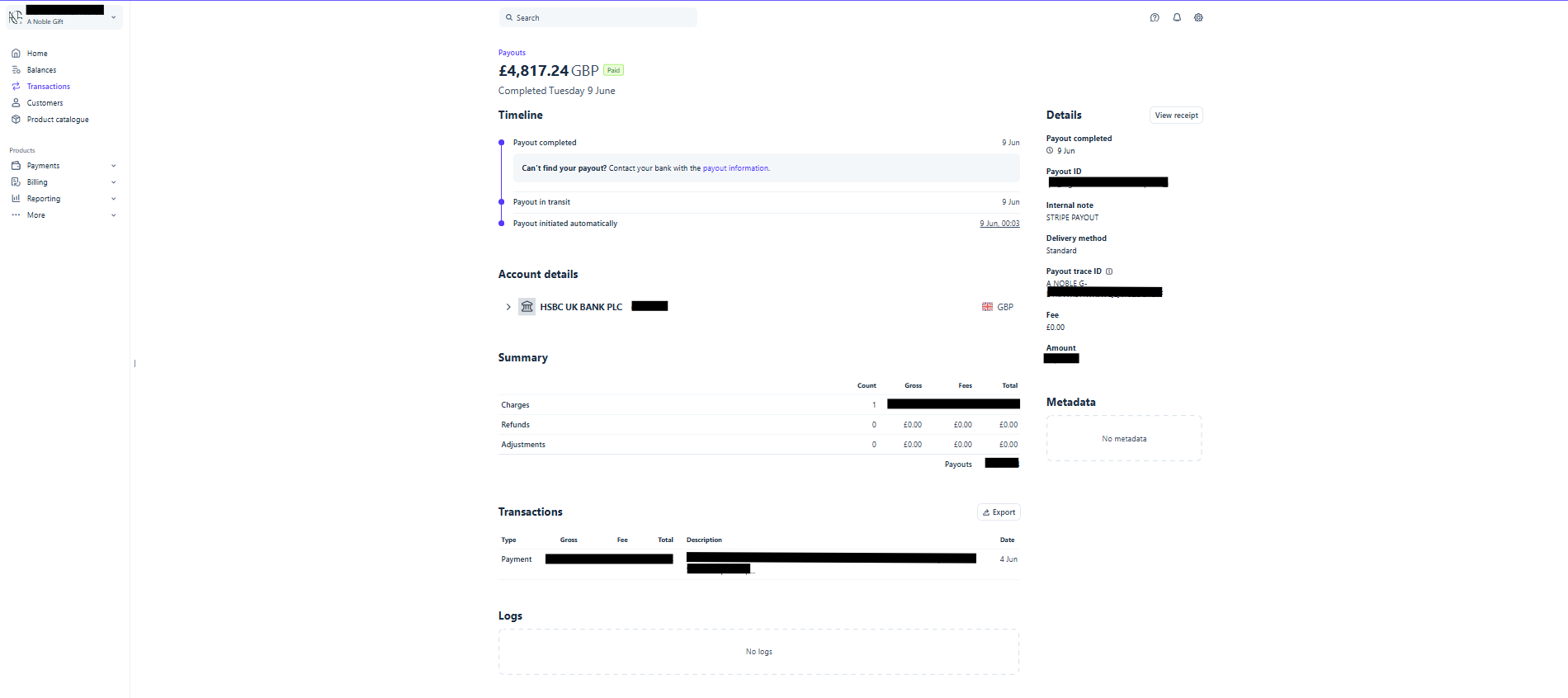
Within the payout above, you can see the following information:
- The full payout amount - noting that this can include amounts from several Auctions or Prize Draws
- Bank account transferred to
- Payout timeline
- ID, Internal Note, Payout Trace ID, and Completed Date
Under "Summary", this breaks down:
- The number of charges/transactions that relate to this payout, e.g. if you closed 6 Auctions on a single day, it's highly likely those 6 transactions would be grouped into a single payout
- The Gross Transactional Amount, before the Collected Fee
- The Collected Fee Amount - this is the A Noble Gift Platform Fee of 18%+VAT (21.6%) on the Winning Bid, and the ANG Card Admin Fee of 2.5%+30p+VAT (3%+36p inc. VAT) on the Gross Transactional Amount
Auction closes with a winning bid of £1,000. Total payable including Platform Fee for the customer = £1,216. Amount raised = £1,000.
On a payout with this single transaction, it would display as follows:
Count = 1
Gross = £1,216.00
Fees = £252.81, broken down by £216 of ANG Platform Fee (paid for by the consumer), and the ANG Card Admin Fee of £36.81 (paid for by your charity, to move the money from A Noble Gift to your Stripe account via Stripe Connect)
Net = £963.19 after the ANG Card Admin Fee
The Total Payout Amount would equal £963.19 in this case, if only the single transaction made up the payout.
Underneath, in "Transactions", this will break down each individual transaction by Gross, Collected Fee, and Total making up the payout. If the Count within Summary is 6, this will display 6 separate transactions.
"View Receipt" at the top right of the Payout page will provide you with a payout receipt for reconciliation.
Balance
This displays your balance summary and supports Payouts, Top Ups, and other Activity. Please note, "Amount" referred to in the "All Activity" tab refers to the Gross Transactional Amount (GTA) paid by the customer. The "Total" is the relevant figure for you, the amount your charity gets after the ANG Card Admin Fee on the GTA.
Transactions
Displays all transactions made on A Noble Gift which have been transferred to your Stripe account. Remember, "Amount" refers to the Gross Transactional Amount paid by the customer.
You can filter transactions by Succeeded, Refunded, Disputed, Failed, and Uncaptured.
Customers
This is not relevant for an Express account, no customers will be visible within this section.
Standard
However, when connecting an Existing Standard Stripe Account through the "Standard" onboarding route, you are able to manage more than just your account with A Noble Gift. Connecting a Standard Stripe Account enables you to receive donations from Auctions and Prize Draws closed on A Noble Gift, as well as collect income through other means, all in the same Stripe account.
Home
Allows you to manage all activity and areas of your Stripe Account. This will show more detail than an Express Account if you use the account for other purposes besides A Noble Gift.
Payouts - this section works identically to an Express account. See Payouts under Express, above → for a full breakdown of how payout figures are calculated.
Balance
This works the same as an Express account, apart from: transactions displayed within Balance will group all transactions, including those which took place on A Noble Gift as well as other transactions you make through your Stripe account.
Transactions
The same as Express, the only difference is this will display all transactions made on the account, including A Noble Gift transactions and any others you make on the account.
Customers
This will only display customers acquired using your own means, customers are not pushed into your account from A Noble Gift.
Still need help?
Can't find what you're looking for? Get in touch and we'll get back to you.